
LEARNING

CMS

What CMS should I use for my site

1. Introduction to Content Management Systems - part 2

1 d. Traditional CMS

Also known as a coupled CMS, the traditional CMS is an all-in-one system that connects the backend (where content is created and managed) to the frontend (where content is displayed to users). Both content management and content delivery are tightly coupled in this system.

  • How it works: The CMS contains everything, including the content database, code for templates, and the delivery system for the website.
  • Best suited for: Simple websites and blogs where you want the CMS to manage both the content creation and the display of content.
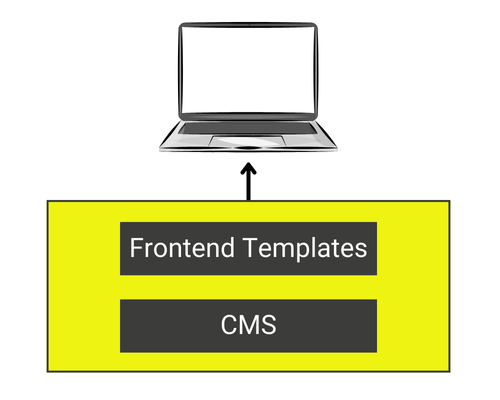
Image illustrating traditional CMS

Examples:

  • WordPress: One of the most widely used traditional CMS platforms for blogs, websites, and small eCommerce stores.
  • Joomla!: A flexible CMS that allows users to build powerful websites and online applications.
  • Drupal: Known for its flexibility and scalability, making it suitable for more complex websites.

Pros:

  • Easy to use for non-developers.
  • Comes with built-in themes and templates for faster setup.
  • Large plugin ecosystems to extend functionalities.
  • Open-source

Cons:

  • Limited control over front-end customisation.
  • Scalability can be an issue for high-performance websites.

Exercise: Using the link below, as well as other resources you may find, make a comparison WordPress, Joomla! and Drupal to help you better understand which of these options would best meet your needs.

Take into account ease of use, supporting documentation and community, features, updates and maintenance.

Comparison website

1 e. Headless CMS

A headless CMS is a system where the content management (the backend) is completely separated from the content delivery (the frontend). The term “headless” refers to the absence of a frontend layer (the “head”).

  • How it works: In a headless CMS, content is created in the backend and is delivered to any device or platform via APIs (Application Programming Interfaces). This means the frontend is handled separately, offering developers more freedom to design unique experiences.
  • Best suited for: Large or complex applications requiring multi-channel content delivery, such as mobile apps, websites, IoT, and digital displays.
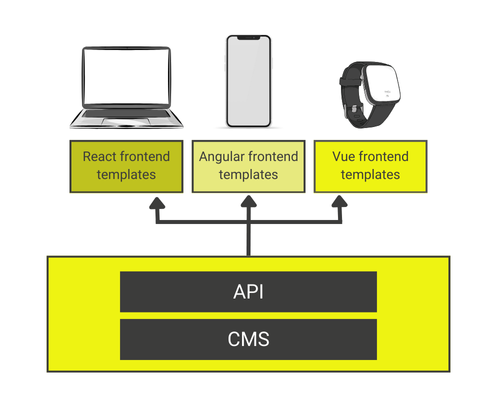
diagram illustrating headless CMS

Examples:

  • Contentful: A cloud-based CMS that allows for managing content and delivering it to various platforms via APIs.
  • Strapi: An open-source headless CMS, which gives developers freedom in creating APIs while offering a flexible and customizable backend.

Pros:

  • Flexibility in front-end design and development.
  • Multi-channel content distribution.
  • More control over performance optimization and scalability.

Cons:

  • Requires more technical knowledge to set up and maintain.
  • No out-of-the-box themes or templates for quick deployment.

1 f. Decoupled CMS

A decoupled CMS is similar to a headless CMS, but with one key difference: the CMS manages the backend content creation and storage, but also provides a frontend presentation layer. However, this presentation layer is optional, and the CMS can still serve content to external platforms via APIs.

  • How it works: The backend content management and frontend delivery are separated, but the CMS comes with an optional presentation layer if needed.
  • Best suited for: Organisations needing flexibility in distributing content across multiple platforms but still want the option for a traditional website frontend.
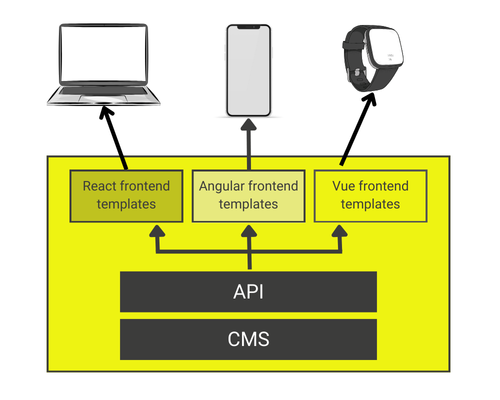
illustration explaining the structure of decoupled cms

Examples:

  • Ghost: A platform designed for professional publishing with a decoupled architecture that allows content to be delivered via APIs or through its own frontend layer.
  • Magnolia: A flexible CMS that combines the power of a decoupled architecture with content personalization and multi-channel delivery.

Pros:

  • Flexibility for multi-channel content distribution.
  • Easier content personalization compared to headless CMS.
  • Provides both traditional and modern delivery options.

Cons:

  • May require more developer involvement compared to traditional CMS platforms.
  • Setup and integration can be more complex.

1 g. Enterprise CMS

An Enterprise Content Management System (ECMS) is designed for large organizations with complex workflows, multiple users, and various content types. These systems often support digital asset management, version control, advanced security features, and compliance with industry regulations.

  • How it works: ECMS platforms are designed for large-scale content management, typically across an entire organization. They often integrate with other enterprise software like customer relationship management (CRM) systems and enterprise resource planning (ERP) tools.
  • Best suited for: Large businesses, organizations, or government agencies that need advanced content management, security, and collaboration features.

Examples:

  • Adobe Experience Manager (AEM): A comprehensive CMS that enables businesses to manage content and digital experiences across multiple channels.
  • Sitecore: A robust platform offering personalization, content management, and eCommerce capabilities.
  • OpenText: A solution designed for managing vast amounts of enterprise data and content.

Pros:

  • Advanced security, compliance, and version control features.
  • Scalable to handle large amounts of content.
  • Integration with other enterprise-level applications.

Cons:

  • Expensive and resource-heavy.
  • Complex to set up and requires significant ongoing maintenance.

1 h. eCommerce CMS

An eCommerce CMS is a platform designed to manage and support online retail businesses. These systems often include features like inventory management, payment gateways, shopping carts, and customer data handling.

  • How it works: These CMS platforms are designed specifically for online stores, combining content management features with eCommerce functionality, such as managing products, customers, and transactions.
  • Best suited for: Businesses focused on selling products or services online.

Examples:

  • Shopify: A leading eCommerce platform that allows businesses to set up online stores with ease.
  • Magento: An open-source eCommerce CMS with extensive customization options and features for large-scale online stores.
  • BigCommerce: A SaaS eCommerce platform with built-in SEO features and support for omnichannel retail.

Pros:

  • Built-in eCommerce functionality, such as payment and inventory management.
  • Specialized for online selling.
  • Often integrates with payment gateways and shipping providers.

Cons:

  • Not ideal for businesses that don’t sell products or services online.
  • Limited in terms of non-eCommerce functionality.

Choosing the right CMS depends on the needs of your business, technical resources, and the complexity of your digital presence. For simple websites and blogs, a traditional CMS like WordPress might be ideal. However, if you’re managing large-scale content or need to distribute it across multiple platforms, a headless or decoupled CMS might offer the flexibility and scalability you require. For enterprise-grade solutions or eCommerce platforms, look into Enterprise CMS or eCommerce CMS options that provide advanced features and capabilities.

Choosing the Right CMS Matters for the following reasons

  • Impact on website performance
  • Effect on SEO and user experience
  • Long-term maintenance and scalability considerations

Exercise: Research and list three websites that use different types of CMS. Identify the CMS used and explain why it might be suitable for that particular website. Feel free to share your finding in the field below.

Plantaurel Learning Hub is brought to you by Marion Curdy.

Contact email: marion@plantaurel.com

SIRET No: 92857823 00019

Privacy Policy

Terms of service